Rewards
Reward players for finding collectibles or completing the whole event.
About rewards
Rewards are items that players can claim for completing the event or finding a collectible. There's no limit to the number of rewards you can create, but we recommend to not create too many as it would be overwhelming for the players.
Creating rewards
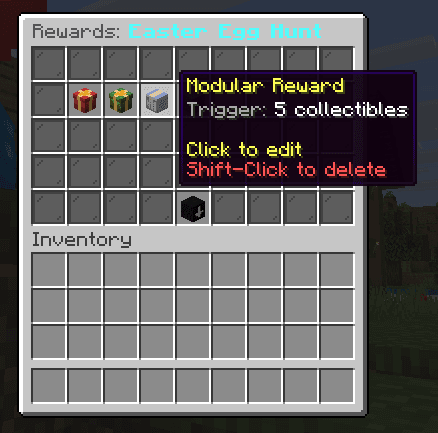
Rewards can be created in Rewards GUI menu by selecting your desired category and then clicking "Add modular" button. You can also set both non-modular rewards for rewarding players when they find the first collectible or completing the whole event.
Customizing rewards
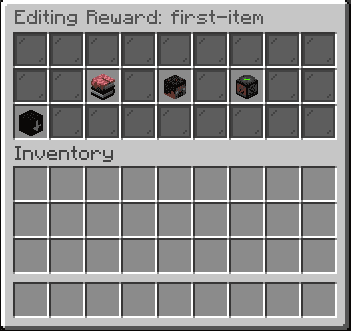
Every reawrd can be customized by clicking on the reward. A new window will pop up with the following options:
- Messages
- Commands
- Sound
Messages
You can sent multiple messages, that will be sent to the player when they receive the reward. These messages can also be formatted in hex colors and gradients. We also support title, subtitle and actionbar messages. If it's still not enough, you can use placeholders to make the messages more dynamic.
Prefix options (use at the start of a message):
[title]- sends a title message[subtitle]- sends a subtitle message[actionbar]- sends an actionbar message[c]- centers the message in chat
Available placeholders:
{p}- prefix from lang.yml{player}- name of player{items-collected}- number of items collected{colors.*}- custom defined colors from lang.yml (e.g. {error}, {success})
Commands
Trigger different commands when the player receives the reward. Useful for giving items, money, XP, etc.
Commands are executed as the console. If you want to give player something, you can use the %player% placeholder.
Sound
Set a sound that will be played when the player receives the reward.
Collectibles
Set blocks as collectibles to be found by players and claim them for rewards.
config.yml
The main configuration file for XenoScavenger.
Last updated on