Collectibles
Set blocks as collectibles to be found by players and claim them for rewards.
About collectibles
Collectibles are blocks that players can find and claim for rewards. There's no limit to the number of collectibles you can create, but we recommend to not create too many as it can become difficult to navigate the GUI.
Creating collectibles
Collectibles can be created under a category by clicking on "Edit Collectibles" button in the Edit Menu, choosing the category and clicking on "Add Collectible Here" button.
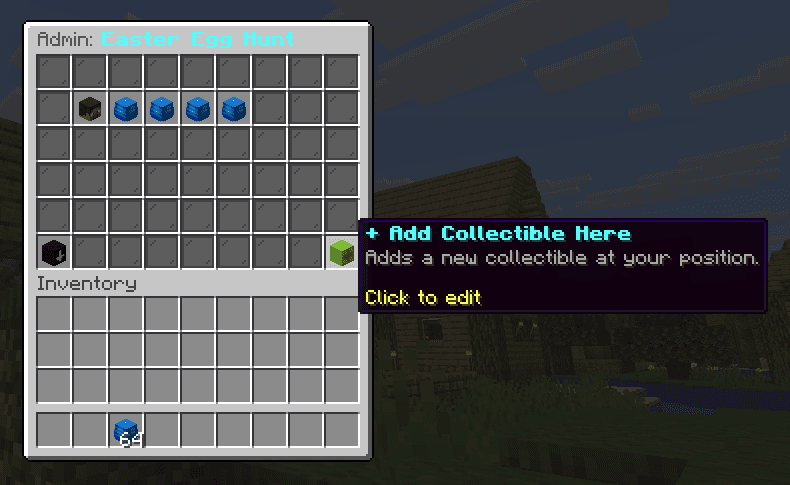
Name your collectible as you would like to see it in the journal and messages.
Customizing collectibles
You can customize the collectible by clicking on the collectible. A new window will pop up with the following options:
- Name
- Description (lore)
- Material
- Location
- Sensory clues
- Permanently delete collectible
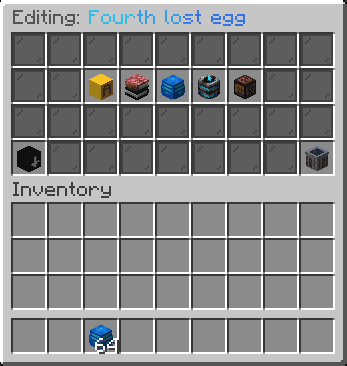
Click on any of the options to edit them.
Name and description
Name and description can also be written in hex colors and gradients.
Colors are available in these formats:
&b&lEaster Egg #1(Minecraft color codes){#00ff00}Easter Egg #1(Hex colors){#00ff00}Easter Egg #1{/#0000ff}(Gradients)
GUI appearance
In GUI Appearance menu, you can set the material or head that will be used as a icon for the collectible. Material can be any block, item, or head. Simply drag and drop the material or head onto the slot to set it.
You can also set a custom material using the file editor. There, you need to specify if the appearance is "MATERIAL", "HEAD", or "TEXTURE". For custom heads or textures, we recommend to use Minecraft Heads.
Format the appearance in file editor like this:
MATERIAL:COBBLESTONE(Block or item available in the game)HEAD:notch(Head of any player)TEXTURE:eyJ0ZXh0dXJlcyI6eyJTS0lOIjp7InVybCI6Imh0dHA6Ly90...(Any custom texture from Minecraft Heads)
Location
The default location for the collectible is where the player is standing where creating a new collectible. You can change the location to a specific block anytime.
You have multiple options to choose how:
Right-Click- The collectible will be placed under the block the player is standing on.Shift-Click- Player will close the GUI and be prompted toRight-Clickon any block they want to set the collectible on.
If you want to teleport to the exact location of the collectible, you can do so by Left-Click the slot.
Sensory clues
Tip for troubleshooting
Sensory clues are a way to give your players a hint about where the collectible is located near the player. Clue can play a sound and also emit particles around the collectible.
Clues can be set for each collectible individually, completely overriding the category settings.
Here's an example if you use HEART as the particle effect set in the category:
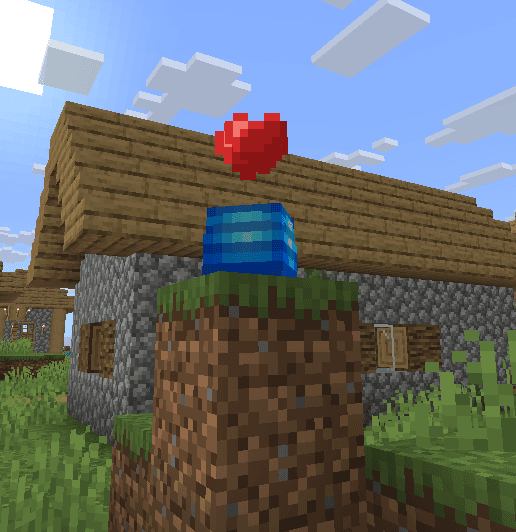
To learn more about sensory clues in categories, click here.
Categories
Create different categories as events and plan your next event easily.
Rewards
Reward players for finding collectibles or completing the whole event.
Last updated on